Stop Paying €50K/Year for SaaS You Barely Use

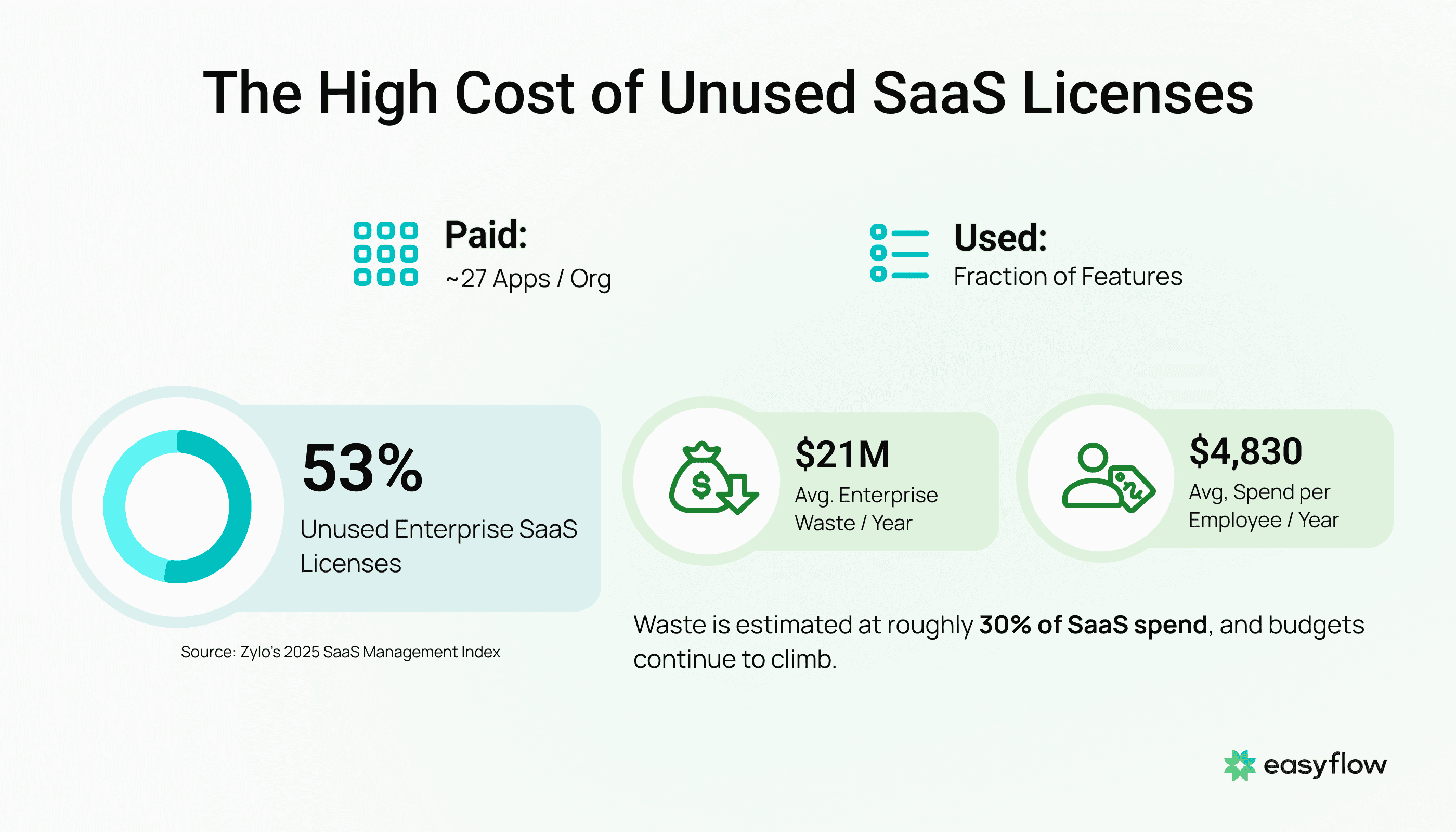
Your company pays for ~27 SaaS apps? Your team uses a fraction of the features in each one. That gap between what you pay for and what you actually use costs the average enterprise around $21 million a year in wasted licenses.
These aren't guesses. Zylo's 2025 SaaS Management Index shows 53% of enterprise SaaS licenses go unused. Gartner-attributed estimates put wasted SaaS spend at roughly 30%. And SaaS budgets keep climbing: the average organization now spends $4,830 per employee annually on software subscriptions.
The Real Problem Isn't Your Software. It's What You Actually Need From It.
Here's what most companies get wrong about their SaaS stack: they think the fix is switching to a different platform. It's not.
The real problem is structural. Enterprise SaaS platforms bundle hundreds of features to serve thousands of different companies. But your team only needs a narrow set of workflows. Your sales reps use the CRM for lead tracking and pipeline updates — not the other 85% of modules. Your HR team runs candidate screening and onboarding — not the analytics dashboards or succession planning tools they're paying for.
When teams routinely use only a small fraction of an enterprise suite's full feature set, the question isn't "which CRM should we switch to?" It's "why are we paying for an entire platform when we only need a few workflows?"
This mismatch between what SaaS delivers and what teams actually need creates three problems that compound every year:
Rising costs with flat usage. SaaS pricing goes up annually — vendors like Salesforce, Microsoft, and Adobe have all raised prices in recent years. Your usage stays the same. You pay more for the same fraction of features.
Tool fragmentation. Duplicate subscriptions are common across departments. Multiple teams pay for overlapping capabilities because each department buys what they need independently — often without central IT visibility.
Vendor lock-in. The longer you use a platform, the harder it is to leave. Your data, processes, and team habits are all tied to a system where you use one-tenth of the functionality.
The "Build Your Own" Trend: Smart Idea, Hard Execution
A new approach is gaining momentum: use AI coding tools (Cursor, Claude Code, Replit, Bolt.new) to build custom internal tools that replicate only the features you actually need. The logic is sound — why pay €50K/year for a full platform when you can build just the slice you use?
Some companies have already gone this route. Vercel, a $9.3B cloud company, has publicly shared how internal teams built custom AI tools to handle workflows previously managed by third-party software — including automating inbound sales processes with AI agents. Walmart reported saving roughly 4 million developer hours by using AI-powered coding tools to streamline deployments and accelerate development across the organization.
The AI coding landscape has matured fast. The 2025 Stack Overflow Developer Survey found about 65% of developers use AI tools weekly or more. SonarSource's 2026 State of Code report puts AI-generated or AI-assisted code at around 42% of all code written. Platforms like Replit Agent can build, test, and deploy complete applications from natural language descriptions. Building custom software has never been faster or cheaper.
But here's what the "build your own" crowd doesn't tell you:
You still need engineering oversight. AI coding tools generate code fast, but developers consistently report spending significant time debugging AI-generated output — sometimes more than it would have taken to write the code themselves. Someone needs to architect, review, test, and maintain what AI produces.
Security isn't optional. A vibe-coded internal tool that handles customer data, financial records, or HR information needs authentication, encryption, access controls, and compliance. SaaS vendors spend millions on security. You'd need to replicate that diligence.
Maintenance is forever. Building the tool takes weeks. Maintaining it takes years. Cloud updates, dependency changes, bug fixes, feature requests — someone owns this for as long as the tool exists.
Not every process needs a new tool. Sometimes the problem isn't the software — it's the manual work happening between and around your tools. The repetitive tasks your team does every day: screening resumes, triaging emails, updating CRMs, processing invoices, generating reports.
The Middle Path: Automate the Workflows, Keep the Tools
What if you didn't need to replace your SaaS or build new software from scratch?
What if you could automate the specific workflows your team actually runs — inside the tools they already use?
That's what AI agents do. Not another platform. Not a DIY coding project. Autonomous software that connects to your existing systems — Gmail, HubSpot, Slack, Notion, your ATS, your ERP — and handles the repetitive work your team does manually.
The difference between building internal tools and deploying AI agents:
Building an internal tool means replacing your CRM with a custom app that does lead tracking. Deploying an AI agent means automating lead scoring, follow-up sequences, and CRM updates inside the CRM you already have.
Building an internal tool means coding a new HR system for candidate screening. Deploying an AI agent means connecting to your existing ATS and automatically screening, scoring, and scheduling candidates — without your recruiters touching a spreadsheet.
Building an internal tool means creating a dashboard that pulls data from five sources. Deploying an AI agent means having reports generated and delivered to Slack every Monday morning — automatically, from the tools that already hold your data.
The advantage is clear: no new systems to build, learn, or maintain. No engineering team required. No months of development. Just the manual work removed from your team's plate.
How to Decide: Build, Buy, or Automate?
Not every SaaS problem has the same answer. Here's a practical framework:
Build a custom tool when you need a capability no existing software provides, you have engineering resources to build and maintain it, and the custom tool will serve your team for years. Good candidates: proprietary data dashboards, industry-specific workflows, competitive-advantage tools.
Keep your SaaS when you use a significant portion of its features, it handles security and compliance you'd struggle to replicate, and the per-user cost is reasonable for the value delivered. Right-size your plan — most companies overpay on tier level and seat count.
Automate with AI agents when your team spends hours on repetitive tasks inside or between existing tools, the problem is manual work rather than missing software, and you need results fast without adding technical complexity. Good candidates: email triage, candidate screening, lead scoring, invoice processing, report generation, CRM updates.
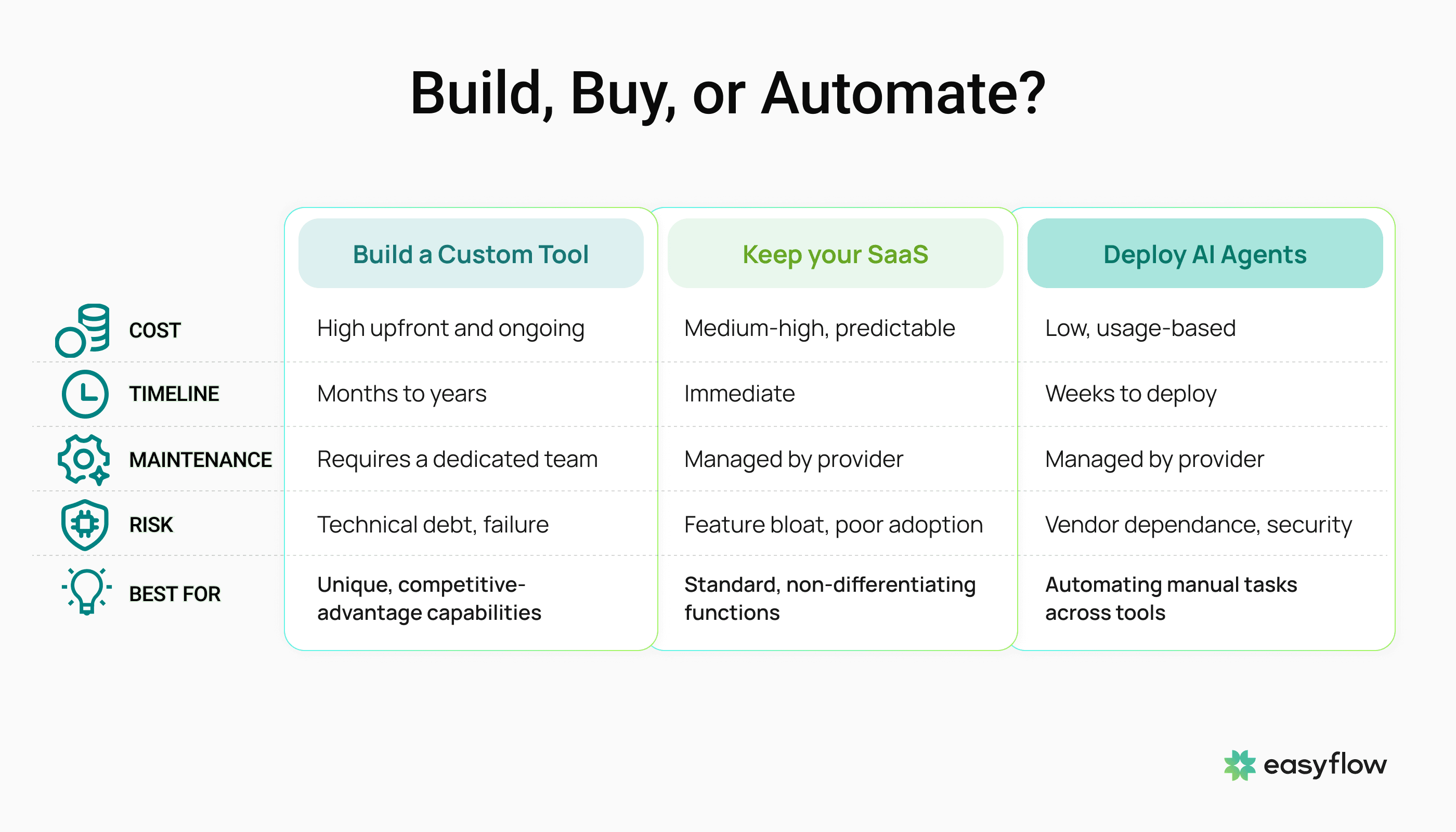
Most companies need a combination. But the biggest, fastest wins almost always come from automating manual workflows — not building new tools or switching platforms.
The Math That Changes the Conversation
Here's what SaaS waste actually looks like for a mid-size company:
A 200-person company spending $4,830 per employee on SaaS pays $966,000 annually. If roughly 30% of that is wasted (based on Gartner-attributed estimates), that's close to $290,000 burned every year on unused features and idle licenses. Cledara's 2025 Software Spend Report found that companies with over 200 staff waste up to 48% of their software spend.
Now compare the options:
Building custom internal tools: $20K-$100K upfront per tool, plus ongoing maintenance, engineering salaries, security audits. Break-even in 1-2 years per tool — if nothing goes wrong.
Deploying AI agents: €1,000-€1,500/month per automated workflow. No upfront development cost. No engineering hire required. ROI measured in weeks, not years. Monthly reporting shows exactly what you save.
For most mid-size operations teams, AI agents deliver faster payback with less risk. You keep your existing tools, eliminate the manual work that drains your team, and redirect budget from SaaS waste to actual growth.
The SaaS Reckoning Is Here — But the Answer Isn't More Code
The SaaS market — estimated around $315 billion in 2025, with projections heading well past $900 billion by 2030 — is facing a real challenge. Companies are waking up to the fact that they pay for entire platforms but use only slivers. The "vibe coding" movement and AI-powered development tools have made building custom software accessible to almost anyone.
But for most growing companies — the ones with 50-500 employees, complex operations, and no spare engineering capacity — the answer isn't rebuilding software. It's automating the manual work that sits between and around the tools they already have.
Your CRM isn't the problem. The six hours your sales rep spends weekly on manual CRM updates — that's the problem. Your ATS isn't the problem. The 40 hours your HR team spends monthly screening resumes by hand — that's the problem. Your email system isn't the problem. The constant switching, reading, classifying, and forwarding — that's the problem.
Fix the work, not the software.
Want to stop paying for SaaS features your team never touches?
Easyflow builds custom AI agents that automate your specific manual workflows — inside the tools you already use. No new software. No engineering team. Setup in 2-4 weeks, with monthly ROI reporting so you see exactly what you save. Book a demo to see how Easyflow can automate the workflows that actually matter.
Posted by

Yura Gnatyuk
CEO
Should I replace my SaaS tools with custom-built internal software?
For most companies, no. Building custom tools requires engineering resources, ongoing maintenance, and security expertise. It makes sense only when you need capabilities no existing software provides and have the team to support long-term development. For most manual workflow problems, AI agents that connect to your existing tools deliver results faster and cheaper.
What's the difference between AI agents and AI coding tools?
AI coding tools (Cursor, Replit, Claude Code) help developers build software faster. AI agents are autonomous software that executes specific business tasks — screening resumes, triaging emails, scoring leads, processing invoices — without human intervention. You don't need coding skills to deploy AI agents. They connect to your existing tools and handle the work your team currently does manually.
How long does it take to deploy an AI agent for workflow automation?
At Easyflow, setup takes 2-4 weeks. The AI agent connects to your existing tools (Gmail, HubSpot, Slack, Notion, your ATS or CRM), learns your specific workflow including exceptions and edge cases, and starts handling tasks autonomously. No technical staff required to manage it after deployment.
Can AI agents really replace the need for expensive SaaS upgrades?
In many cases, yes. Companies upgrade SaaS tiers to get automation or reporting features they could achieve with AI agents at a fraction of the cost. Before upgrading, ask: "Is the problem missing features or manual work?" If it's manual work, an AI agent often solves it for €1,000-€1,500/month instead of a €10,000+ annual tier upgrade.